Gmail
Keep the mail header focused on the tools you actually use.
Free, open-source browser extension
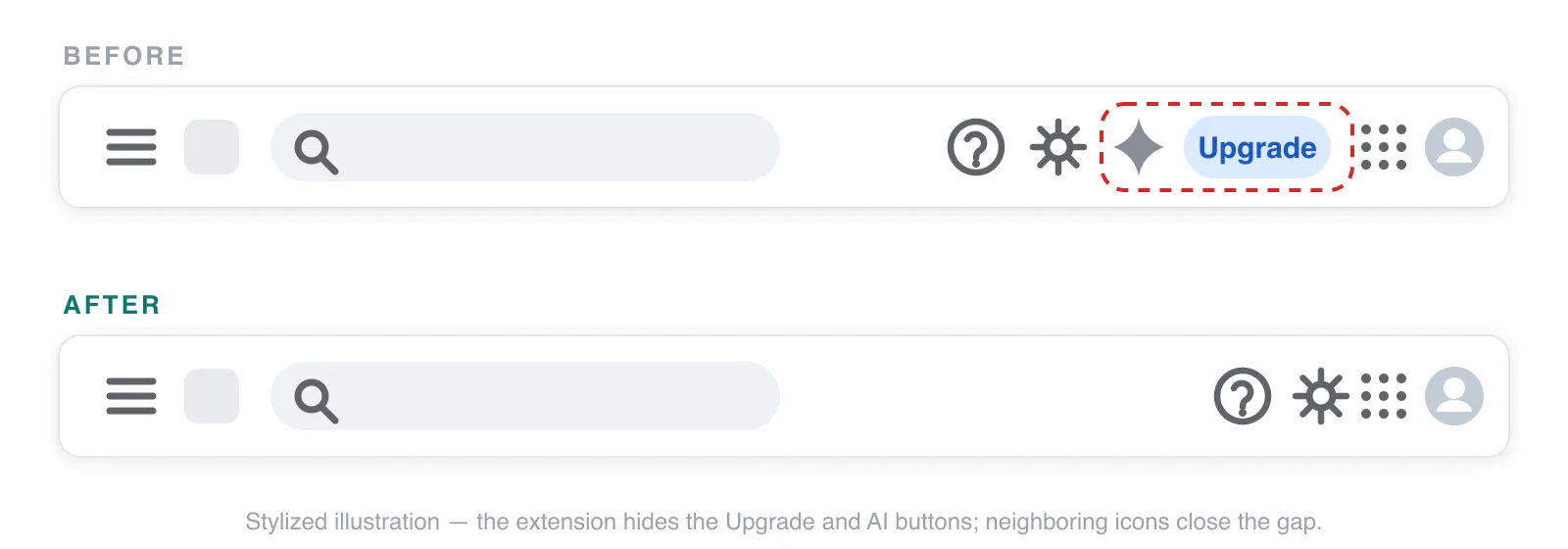
Remove the Upgrade and Ask Gemini buttons from Google’s headers — without tracking, data collection, or network requests.

Supported products
Keep the mail header focused on the tools you actually use.
Remove the upsell while browsing and organizing your files.
Works in Docs, Sheets, Slides, and their home screens.
Optionally hide the Upgrade button after granting access once.
Your choice
Two simple toggles in the extension popup let you control each button independently. Both are on by default, and changes apply live to open tabs.
Removes the persistent subscription upsell.
Removes the neighboring AI promotion.
Private by design
The extension has no server and makes no network requests. It inspects only the header controls it needs to hide, in memory, and never reads your email, files, or document contents.
No analytics or telemetry
No tracking or advertising
No personal data collection
No remote code or network requests
Nothing hidden
The extension requests only the browser capabilities and Google sites required for its single purpose.
storagescriptingmail.google.comdrive.google.comdocs.google.comcalendar.google.comQuestions
It hides the Upgrade subscription button and the Ask Gemini button in Gmail, Google Drive, and Google Docs. It also hides the Upgrade button in Google Calendar after you grant optional access. The Upgrade and Ask Gemini settings can be enabled or disabled separately.
No. It looks only at toolbar controls in supported page headers. Nothing is recorded or transmitted, and there is no server to receive data.
Required access lets its content script run on Gmail, Drive, and Docs, where it finds and hides the selected buttons. Calendar access is optional and starts only after you enable it once in the popup.
The extension fails safely: if a match is ambiguous, it leaves the page unchanged. If a button comes back, report it in GitHub Issues and an extension update can restore hiding.
Install the free extension, keep both toggles on, and get back the space used by Upgrade and Ask Gemini.
Need help? Open the support guide.